Basic control panel for ACS355 and ACS550
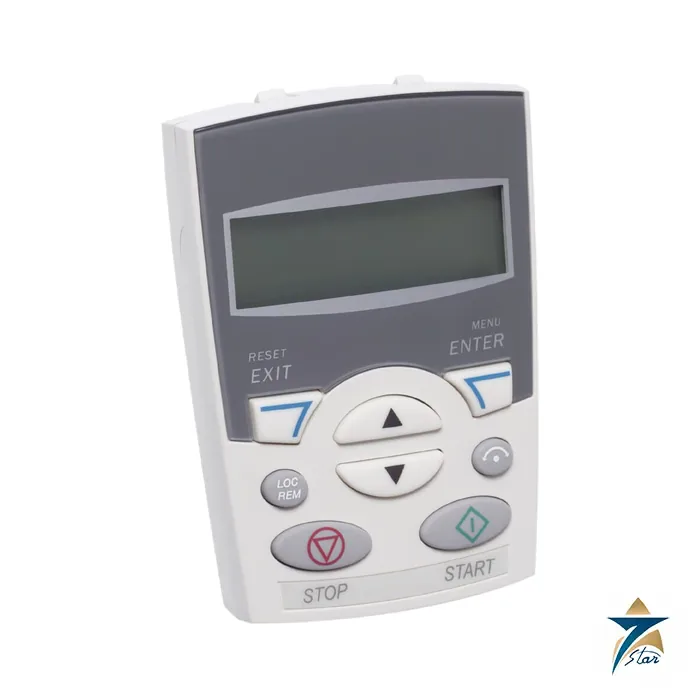
ACS-CP-C is ABB’s basic control panel for the ACS310, ACS350, ACS355 and ACS550 drives. It has a single-line numeric LCD and a small set of keys for starting and stopping the drive, setting a reference, changing parameter values and copying parameters from one drive to another.
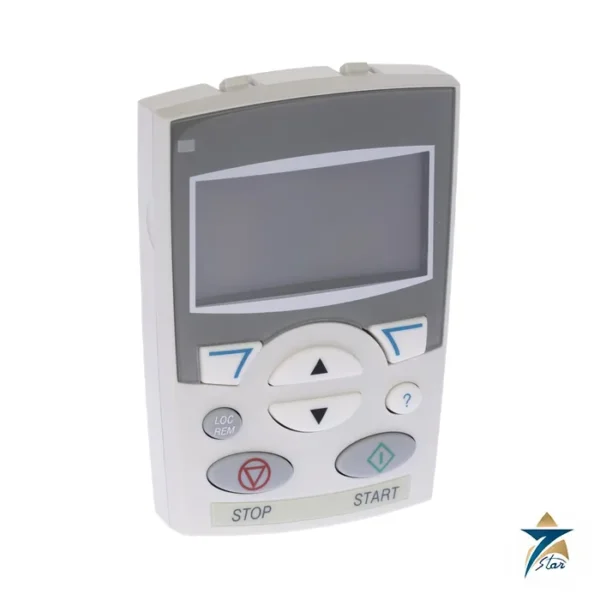
It is the simpler partner of the ACS-CP-A assistant panel, and the drives it serves, such as the ABB ACS355, are in the AC drives category. In drive type codes it appears as option J404; ACS550 drives ship with the assistant panel as standard, so J404 selects this basic panel instead.
Technical specifications
| Parameter |
Specification |
| Type designation |
ACS-CP-C (ABB product number 64739000) |
| Description (ABB) |
ACS310/350/355/550 Basic control panel |
| Ordering code on drives |
J404 on ACS355 and ACS550 (choose one panel option only) |
| Display |
Numeric LCD, single line |
| Areas of the display |
Five: LOC/REM, unit, value or code, panel state, FWD/REV/SET indicators |
| Panel modes (ACS550) |
Output, Reference, Parameter, Copy and Fault |
| Copy function |
Parameters can be copied to panel memory and to another drive |
| Languages |
No language support (the assistant panel has it) |
| Version compatibility |
ACS550 manual: ACS-CP-C Rev. M or later |
| Mounting kits |
ACS/H-CP-EXT or OPMP-01 for door mounting |
Panel operation in practice
After power-up the panel opens in Output mode, where you can start, stop, change direction, switch between local and remote control, and watch up to three actual values one at a time. The other four modes are reached from the Main menu: Reference, Parameter, Copy and Fault. The Fault mode opens automatically when a fault or alarm occurs, shows its code, and allows a reset. Basic-panel alarms use codes of the form A5xxx.
The panel LCD is divided into five areas: LOC or REM at upper left, the unit of the value at upper right, the value or code in the centre, the panel state (OUTPUT, PAR, MENU or FAULT) at lower left, and FWD, REV and SET indicators at lower right. MENU/ENTER saves a parameter value and RESET/EXIT leaves without saving.
When to choose the basic panel
Choose the ACS-CP-C when the drive is set up once and then runs unattended, when budget matters, or when the machine already uses a PC tool or FlashDrop for configuration. Choose the assistant panel instead when technicians need languages, start-up assistants, the clock and the Changed Parameters list. The ACS355 catalog states that the assistant panel is standard on IP66/IP67 drives.
The ACS550 manual is written for ACS-CP-C Rev. M or later. For panels mounted on a door, ABB offers the ACS/H-CP-EXT kit or the OPMP-01 holder; both include 3 m extension cables.
Installing the ACS-CP-C on the drive or a cabinet door
Fit the basic panel with the drive isolated and the DC link discharged according to the ABB drive manual, then seat it squarely in the panel slot so the connector engages without force. On the ACS355 and ACS550, check that only one panel option is used per drive; option J404 replaces the assistant panel rather than adding to it. When operators must use the panel with the enclosure closed, plan the door position before cutting, using the ACS/H-CP-EXT kit or the OPMP-01 holder named above, and route the extension cable away from motor cables and braking resistor leads so it is not pinched by the door hinge.
A panel on a door is easier to read and keeps hands away from live parts, but the cut-out and any gasket must keep the enclosure rating the machine was designed for. Recheck the door seal after fitting, particularly on panels that are opened often during commissioning.
Commissioning with the basic panel
Because the ACS-CP-C has no start-up assistant, commissioning is done parameter by parameter in Parameter mode. Prepare a written list of the motor nameplate data, control source, reference source, ramp times and limits from the drive firmware manual before switching on, and enter them in a logical order. Use MENU/ENTER only once each value has been checked, since RESET/EXIT leaves without saving. After the first test run in local control, switch to remote and confirm that start, stop and reference signals arrive from the PLC or field devices as intended.
Once the drive behaves correctly, use the Copy mode to upload the parameter set to the panel memory. The same panel can then download it to an identical drive, which keeps a line of similar pumps or fans consistent and gives maintenance staff a quick way to restore a known configuration after a drive is replaced. Keep the paper parameter list as well, because a panel can be lost or reused elsewhere.
Routine checks and fault handling
During routine maintenance, look at the panel display for readability and at the keys for wear, and wipe the front with a dry or slightly damp cloth rather than solvents. When the Fault mode opens, record the code shown before resetting, then look it up in the drive manual; repeated resets without finding the cause can hide a cooling, wiring or load problem. A short log of fault codes and dates helps the next technician see whether a trip is new or recurring.
Operating in Omani and GCC plant rooms
Drives in Oman are often installed in hot MCC rooms, pump houses and outdoor kiosks where dust and humidity are part of daily operation. A single-line numeric display is simple to read, but direct sunlight through a kiosk window or glare from a door can still make it hard to see, so choose a door position that is shaded and at a comfortable height. Keep cabinet filters clean so the drive and panel are not sitting in trapped heat, and close the enclosure promptly after adjustments to limit fine sand entering around the panel. In coastal sites with salty, humid air, inspect the panel connector and extension cable plugs during planned shutdowns for signs of corrosion or loose seating.
If the site team changes parameters only occasionally, the basic panel suits that pattern well; if several shifts need guided set-up in their own language, review the assistant panel instead before placing an order.
Documents and quotation
The linked ABB ACS550 catalog describes the basic control panel and lists option J404. Seven Star LLC supplies the ACS-CP-C on request from Muscat; give the drive type with your RFQ. ABB’s product page does not list weight or dimensions, so ask if you need them. Confirm compatibility with your drive model and panel revision before ordering.











Reviews
There are no reviews yet.