Assistant control panel for ACS355 and ACS550
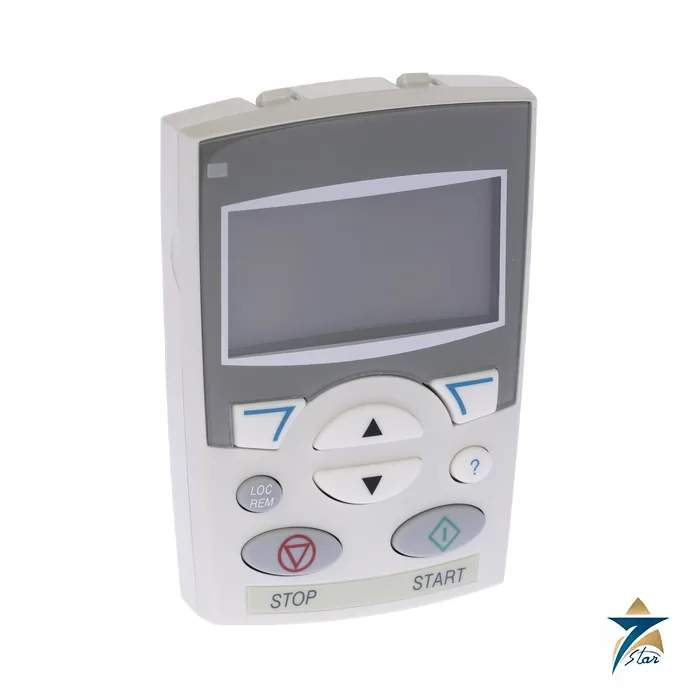
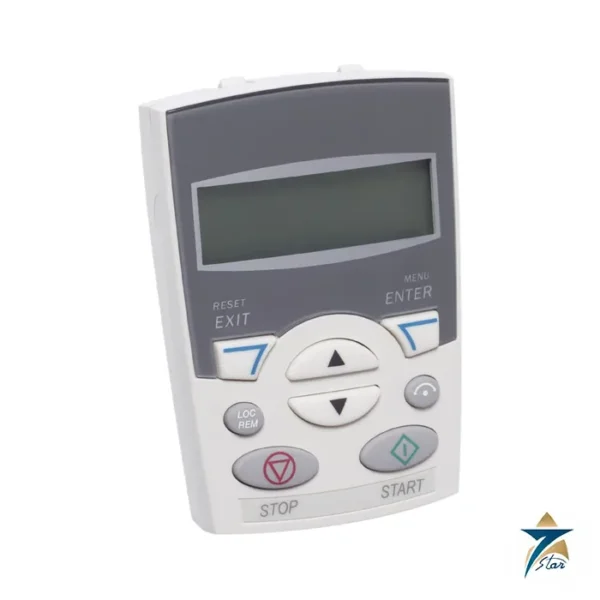
ACS-CP-A is ABB’s assistant control panel for the ACS310, ACS350, ACS355 and ACS550 drives. It replaces the numeric display of the basic panel with a multilingual alphanumeric LCD, guided assistants and a built-in help key, so a technician can commission a drive without looking up parameter numbers.
On the ACS550 the assistant panel is delivered as standard, and on the ACS355 it is an option coded J400. Related drives and a basic-panel alternative are covered on the ABB ACS355 drive page and in the Automation Accessories category.
Technical specifications
| Parameter |
Specification |
| Type designation |
ACS-CP-A (ABB product number 64691473) |
| Description (ABB) |
ACS310/350/355/550 Assistant control panel, area 1 |
| Ordering code on drives |
J400 on ACS355 (choose one panel option only) |
| Display |
Alphanumeric LCD with graphical elements and two soft keys |
| Languages |
Language selection for the display |
| Assistants |
Start-up Assistant and other parameter assistants; context-sensitive help |
| Clock |
Real-time clock for fault logging and time-based control, with a backup battery |
| Copy function |
Parameters can be uploaded to the panel and downloaded to other drives |
| Panel modes (ACS550) |
Output, Parameters, Assistants, Changed Parameters, Fault Logger, Time and Date, Parameter Backup, I/O Settings and Fault |
| Version compatibility |
ACS550 manual: ACS-CP-A Rev. F or later (panels built since 2007) |
| Mounting kits |
ACS/H-CP-EXT or OPMP-01 with 3 m extension cable for door mounting |
How the panel is used
The ACS550 user manual describes the keys as two context-sensitive soft keys, up and down arrows, local/remote, help, stop and start. The right soft key usually enters a mode, accepts an option or saves a change, while the left soft key cancels. When a fault or alarm occurs, the panel jumps to Fault mode automatically and shows the message for reset.
The Parameter Backup mode uploads all parameters, including up to two user sets, into non-volatile panel memory, and downloads them to the same drive or another one of the same type. That memory does not depend on the panel battery, which only keeps the clock running when the panel is not powered by the drive.
Choosing between panel versions
ABB’s ACS550 manual lists three assistant panel versions: ACS-CP-A for area 1, ACS-CP-D for Asia, and the basic ACS-CP-C. Manuals are written for ACS-CP-A Rev. F or later. If the drive already has a panel, press the help key at power-up to read the panel firmware version. The basic panel is a simpler numeric choice without languages or assistants.
For door mounting ABB sells panel kits, ACS/H-CP-EXT or the OPMP-01 platform, which include 3 m extension cables and installation instructions.
Selection checks before ordering the ACS-CP-A
Start with the drive itself: note the drive type, its existing panel if any, and whether the panel will sit directly on the drive or on an enclosure door. For ACS355 projects, check whether the J400 option was already specified with the drive order, so the plant does not end up with a duplicate panel. For older ACS550 installations, the panel revision and firmware are worth recording, because the manuals are written around a particular panel revision. Where several drives of the same type are installed, one assistant panel used for parameter backup and copying can simplify the commissioning of identical machines, but each drive still needs a suitable panel or a planned method of local operation.
Installing the panel on the drive or the enclosure door
When the panel is mounted directly on the drive, make sure it is seated firmly and that the drive cover and surrounding cabling do not strain it. For door mounting with one of the ABB kits named above, route the extension cable away from motor cables and power wiring, secure it so that opening the door does not pull on the connectors, and follow the kit instructions for the door cut-out and sealing. A door-mounted panel lets operators read values and reset faults without opening the enclosure, which also helps keep dust out of the cabinet.
Commissioning and parameter backup practice
The Start-up Assistant guides the technician through motor data and basic settings in plain language. After commissioning, upload the parameters to the panel memory and keep a separate written or electronic record as well. Set the real-time clock to local time so that fault log entries can be matched with plant events, and check the date again after any long period without power. Before downloading a parameter set to another drive, confirm that the target drive is of the same type and that the motor data applies to that machine.
Use in Omani panel rooms and outdoor kiosks
LCD displays and keypads are affected by the same heat and dust that stress the drives they serve. In GCC summers, a panel on a door exposed to direct sun or to a hot plant room may become hard to read and should be shaded or placed inside an air-conditioned room where possible. Fine sand can work its way into door openings around the panel, so check door seals and gaskets during routine visits. In humid coastal sites, avoid cleaning the panel with wet cloths or solvents; a dry, soft cloth is the safer choice. The backup battery for the clock should be checked when the time drifts or resets.
Handling faults with the assistant panel
When the panel switches to Fault mode, note the message and the time stamp before resetting, and check the Fault Logger for earlier entries that may reveal a pattern. Repeated faults at the same time of day often relate to supply conditions or process load rather than the drive, so sharing the logged data with the maintenance team helps find the root cause faster.
Documents and quotation
The linked ABB ACS550 catalog describes the panel options, and the ACS355 catalog repeats them for that family. Seven Star LLC supplies the ACS-CP-A on request from Muscat; state the drive type with your RFQ. ABB’s product page lists no weight or dimensions, so request them if you need a cut-out size. Confirm compatibility with your drive’s panel connector and firmware before ordering.












Reviews
There are no reviews yet.