Start a new field power section on a POINT I/O node
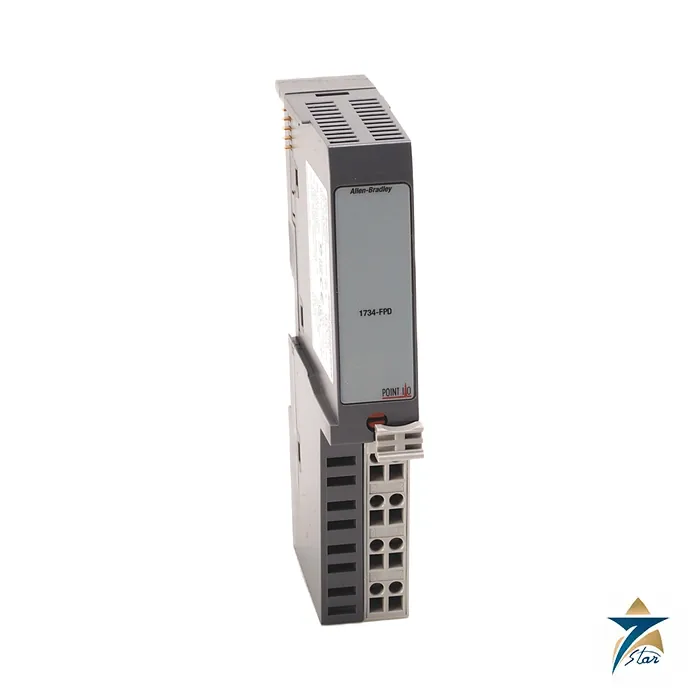
The Allen-Bradley 1734-FPD is a POINT I/O accessory that splits the internal field power bus of a node. It sits between two I/O modules and cuts the field power connection to its left, then re-supplies the modules to its right from its own input. This lets one node mix 24 V DC modules with 120 or 240 V AC modules, or give a group of heavily loaded outputs their own supply, without a second adapter.
The module has no indicators and consumes no power itself. The POINTBus signals pass straight through, so only the field-side supply is separated, and the manual states that the 1734-FPD changes the field power current available, not the backplane current.
Technical specifications
| Parameter |
Specification |
| Catalog number |
1734-FPD (1734-FPDK conformal coated), series B documentation |
| Module type |
POINT I/O field power module that breaks and re-supplies the internal field power bus |
| Function |
Breaks the internal field power bus and starts a new field power section for the modules to its right |
| Module location |
Between I/O modules in a POINT I/O system |
| Input voltage rating |
12V DC or 24V DC nominal (10…28.8V DC range); 120V AC or 240V AC nominal |
| Input current |
10 A maximum |
| Field power bus supply |
264V AC maximum; 12/24V DC 10…28.8V DC, or 120/240V AC at 50/60 Hz |
| Field power bus current |
10 A maximum |
| POINTBus current |
Pass through (the backplane is not broken) |
| Indicators / power consumption |
None; no power consumption or dissipation |
| Isolation |
50V continuous, tested at 2600V DC for 60 s |
| Terminal base screw torque |
0.6 N•m (7 lb•in) |
| Dimensions / weight |
79.8 x 25.3 x 133.1 mm (3.14 x 1.00 x 5.24 in.); 0.12 kg (0.27 lb) |
| Wire size |
0.25…2.5 mm² (24…14 AWG) solid or stranded copper, rated 75 °C or greater |
| Enclosure type rating |
None (open style) |
| Ex rating note |
Complies with Ex when used at or below 120V AC |
| Temperature codes (as printed) |
North American T4A; UKEX/ATEX T4; IECEx T4; Zone 2 Ex ec IIC T4 Gc as printed |
Where to place the module
Typical reasons to add the module are to run a group of modules from a different voltage, to keep a heavily loaded output group on its own supply, or to stay within the current limit of the field power bus. The CompactLogix 5370 L1 controller documentation also uses it as a way to give local expansion modules their own field power: the modules to its right can draw as much field power current as the module allows.
Wire the supply to the terminals shown in the installation instructions: for 12 or 24 V DC use the supply and common terminals, and for 120 or 240 V AC use L1, L2/N and chassis ground. Mount the module on the DIN rail where the system layout calls for the new section, and follow the warnings in the installation instructions about inserting or removing modules with power applied in hazardous locations.
Hazardous-area and sizing notes
The installation instructions carry Class I Division 2 and Zone 2 markings for the product when the catalog number is marked, with special conditions for installation in a Zone 2 enclosure of at least IP54. The AC rating applies at or below 120 V AC for Ex use. Size each field power section so that the combined current of its modules stays within the 10 A limit.
Planning field power sections on a 1734-FPD node
Before ordering, sketch the node from left to right and mark every point where the field-side voltage or the load group changes. Each of those boundaries is a candidate position for a 1734-FPD. Write down the modules that will sit to the right of each break and add up the field-side current they will draw from that section, so the section stays inside the 10 A limit quoted in the specification table. When a section approaches that figure, splitting it again with a second field power module is usually cleaner than accepting a supply that runs close to its ceiling.
- Keep AC and DC groups physically separated by the module, never mixed within one section.
- Group outputs that switch inductive or high-current loads together, so their supply can be fused and isolated independently of sensitive inputs.
- Remember that only field power is split; backplane current still comes from the adapter or controller and must be budgeted separately.
- Record which external supply feeds each section on the panel drawing, so maintenance staff can isolate one group without guessing.
Installation and commissioning checks
With the rail populated and the supply wired, check polarity on the DC terminals or line and neutral on the AC terminals before energising. Tighten terminal screws to the torque given above and use copper conductors within the listed wire range and temperature rating. Because the module itself has no indicators, commissioning relies on the modules downstream of it: power the new section and confirm that the I/O modules to the right report field power present, while modules to the left remain on their original supply. A quick test is to remove the supply to the new section and check that only the expected group loses field power.
Maintenance and troubleshooting
Most problems traced to a field power module are wiring or layout issues rather than a failed part. If modules to the right of the break show a field power fault, measure the voltage at the module input terminals first, then check the external fuse or breaker feeding that section. If modules on both sides are affected, the cause is more likely in the upstream supply or the adapter. When a section has grown over time, recheck the current total against the limit before blaming the hardware.
- Inspect terminal screws during planned shutdowns, since thermal cycling can loosen connections.
- Look for discolouration on the terminal base, which suggests a high-resistance joint.
- Do not insert or remove modules under power in a hazardous location; follow the warnings in the installation instructions.
Application notes for Oman and GCC sites
POINT I/O is an open-style product with no enclosure rating, so in Oman it belongs inside a cabinet sized and ventilated for summer ambient conditions. Panels on outdoor skids or in non-air-conditioned substations can run very warm, so position the node away from drive heat sinks and transformers, and confirm that the cabinet design keeps internal temperature within the Rockwell rating. Fine desert dust settles on terminal bases and DIN rails; filtered ventilation and gasketed doors reduce the risk of tracking between field terminals, especially where 120 or 240 V AC sections share the rail with low-voltage DC groups.
On coastal plants, ports and desalination sites, salt-laden humidity accelerates corrosion of screw terminals and rail contacts. For those locations it is worth considering the conformal coated 1734-FPDK variant listed in the specification table, together with a properly sealed enclosure. In Zone 2 areas such as oil and gas facilities, observe the special conditions in the installation instructions, including the minimum IP54 enclosure, and keep the AC section at or below the voltage that applies for Ex use.
Documents and quotation
The Rockwell Automation installation instructions for the 1734-FPD are attached. For the matching terminal bases see our automation accessories, and for adapters see the 1734-AENTR. Confirm the exact catalog number, series letter and firmware or hardware revision on the product label, and the compatibility with your existing system, before ordering. Stock and lead time are confirmed at quotation.












Reviews
There are no reviews yet.