- Automation & ControlView all 2,239 products
- Automation Accessories
- AC Drives
- PLC & I/O Cards
- Industrial Communications
- Vibration Monitoring
- Controllers & Data Acquisition
- Isolator & Barrier
- CCTV & Security
- Safety Switches & Guard Locking
- Encoders
- Motor Soft Starters
- HMI Displays
- Pneumatic Cylinders
- Industrial Computers
- Servo Drives
- Machine Vision
- Automation Software
- Robotics

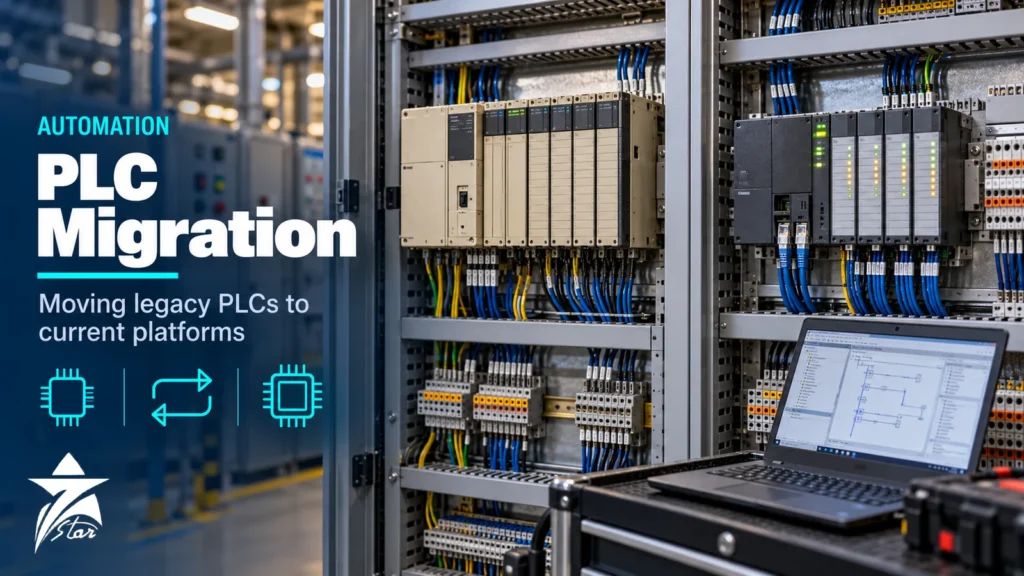
Many plants in Oman and the GCC still run on controllers installed twenty or thirty years ago: Siemens S5 and S7-300, Allen-Bradley PLC-5 and SLC 500, Modicon 984 and similar platforms. They usually work, which is exactly why replacement keeps getting postponed until a CPU fails and no spare can be found. PLC migration is the planned move from such a legacy controller to a current platform with the shortest possible outage and no loss of function. This guide covers how to judge urgency, choose a migration strategy, convert the software, keep the field wiring, test before cutover and manage the risks that typically derail these projects.
Why Migrate Now: Reading the Lifecycle Signals
Manufacturers move products through stages: active, end-of-life announcement (still sold, successor named) and discontinued (sold only as spare parts, or not at all). The trigger to plan a migration is the announcement, not the day the last spare disappears.
- Allen-Bradley PLC-5: Rockwell Automation lists the main PLC-5 processors, such as the 1785-L80B and 1785-L80E, as discontinued from July 2017, and the 1771 I/O modules have been discontinued in stages since then.
- Siemens S7-300: Siemens began the S7-300 and ET 200M phase-out in October 2023, and published notices put the move to spare-parts-only supply in October 2025. The named successors are S7-1500 controllers with ET 200MP or ET 200SP I/O.
- Siemens S5: discontinued many years ago; remaining support depends on the second-hand and repair market.
- Engineering software and PCs: legacy programming packages often need an old operating system or a serial or proprietary network card. Losing the last working programming laptop can be as serious as losing a CPU.
Rank each controller by consequence of failure and by spare availability. A CPU with no spare that controls a production-critical unit is the first candidate, even if it has never failed. For keeping the old system alive while the project is prepared, see our guide to sourcing obsolete PLC and DCS parts.
Migration Strategies Compared
There is no single correct approach. The choice depends on the outage window available, the condition of the field wiring and the budget.
| Strategy | What changes | Outage | Best suited to |
|---|---|---|---|
| CPU-only replacement with I/O adapter | New CPU drives legacy I/O racks through a manufacturer adapter or gateway | Short | Sites where the old I/O is still reliable and only the CPU is at risk |
| Phased migration | CPU first, I/O racks replaced rack by rack in later shutdowns | Several short outages | Large systems where a single long shutdown is not possible |
| Wiring-conversion (swing-arm) migration | New I/O modules connected to existing field wiring through conversion terminal blocks or pre-wired harnesses | Short to medium | Racks with sound field wiring; avoids re-terminating every cable |
| Full replacement (rip and replace) | New panel, CPU, I/O and wiring; often new HMI as well | Long, or hot cutover with parallel panels | Old panels in poor condition, major process changes, or a move to a new building |
| Hot cutover | New system installed in parallel and loops transferred one at a time while the plant runs | Little or none | Continuous processes that cannot shut down; demands strict procedures |
Several manufacturers offer conversion kits that let new I/O modules mount in place of old ones and plug into the existing field wiring arms. Where these exist, they reduce the risk of termination errors, which is one of the largest sources of commissioning problems.
Step 1: Audit What You Actually Have
Most legacy systems differ from their drawings. Before any design work, build an accurate baseline.
- Upload the running program from every controller and confirm it matches the latest backup. Note any online edits that were never saved.
- Record the catalogue number, series, revision and firmware of every CPU, communication and I/O module.
- Walk down each panel and compare the actual terminations with the loop and wiring diagrams; mark up differences.
- Identify every external connection: HMI, SCADA, DCS, drives, remote I/O, printers, serial links to analysers or metering skids.
- Capture current setpoints, PID tuning, timer and counter presets and any recipe data stored in the controller.
- Interview operators and maintenance staff about undocumented workarounds, forced bits and known nuisance alarms.
Step 2: Choose the Target Platform
The natural successor within the same manufacturer usually offers the best conversion tools and I/O adapters: S7-300 and S5 users commonly move to S7-1500, and PLC-5 or SLC 500 users to ControlLogix or CompactLogix. A change of manufacturer can make sense when the site wants to standardise on another platform, but it removes automatic conversion and increases the testing effort. Apply the same criteria as for a new system: I/O types, redundancy, communications, cybersecurity features, cabinet temperature and the lifecycle horizon of the new family. Engineering licences for the target platform can be supplied with the hardware from our automation software range.
Step 3: Convert the Application Software
Manufacturers provide conversion tools that translate legacy programs into the new environment. They save time but are not a finished result.
- Instructions without a direct equivalent are flagged or replaced with placeholder code that must be rewritten by hand.
- Data addressing changes: fixed file or data-block addresses become symbolic tags, and indirect addressing often needs restructuring.
- Timing changes: a faster CPU, different scan model or asynchronous I/O update can change the behaviour of logic that relied on scan order or one-shot timing.
- Analog scaling, PID algorithms and filter constants may differ between platforms; loops usually need checking and sometimes retuning.
- Communication instructions (message blocks, peer-to-peer links) almost always need redesign for the new network.
Treat the converted code as a draft. Many teams use the migration to clean up dead code, add comments and standardise function blocks, but keep functional changes to a minimum. Mixing a platform change with a process change makes it hard to tell whether a problem comes from the conversion or the new design.
Step 4: Networks, HMI and Third-Party Interfaces
Legacy networks such as Data Highway Plus, Remote I/O, MPI, SINEC L2 or proprietary serial links rarely exist on new controllers. Decide for each link whether to replace the device at the other end, use a protocol gateway, or keep a communication module in a bridge rack for a transition period. Check that the SCADA or HMI panel has a driver for the new controller and that tag addresses can be remapped efficiently. Third-party skids such as compressors, metering or water treatment packages often exchange data over Modbus; confirm their register maps before cutover. Our article on industrial communication protocols summarises the options.
Step 5: Test Before the Shutdown
The outage should be spent on installation and loop checks, not on finding software errors. A factory acceptance test with the real hardware and a simulation of the process is the most effective risk reduction in a migration.
- Compare old and new logic side by side for each interlock and sequence, using the cause-and-effect charts where they exist.
- Simulate inputs and verify outputs, alarms, trips and HMI displays.
- Test failure behaviour: power loss and restart, communication loss, module removal and the state of outputs on CPU stop.
- Confirm timing of fast functions such as counters, pulse outputs and first-out alarms.
- Document every test with a signed record so that the site acceptance test can focus on wiring and field devices.
Step 6: Plan the Cutover
Write a cutover procedure with a step list, responsible persons, hold points and a fallback plan. Keep the old CPU, I/O and the last program backup intact and labelled until the new system has run through a full operating cycle. Define which loops are checked first so the unit can restart in a controlled order. For hot cutover, transfer loops one at a time with operations staff present and the loop placed in a safe state before each transfer.
Risks That Derail PLC Migration Projects
| Risk | Typical cause | Mitigation |
|---|---|---|
| Hidden functionality | Undocumented logic, online edits, operator workarounds | Upload and compare running programs; operator interviews |
| Wiring errors at cutover | Re-terminating hundreds of cores under time pressure | Conversion harnesses, pre-labelled cables, point-to-point loop checks |
| Behaviour change | Different scan timing, PID algorithm or analog scaling | Simulation testing, loop retuning plan, trend comparison after start-up |
| Lost interfaces | Unsupported legacy network to a skid or analyser | Interface register, gateway selection and testing before shutdown |
| Overrun outage | Underestimated scope, missing parts on site | Detailed task list, hardware check before shutdown, fallback plan |
| Safety functions affected | Trips sharing the basic control PLC | Separate impact assessment and management of change for any safety-related function |
If the legacy controller performs safety functions, the migration is a modification under the site’s management of change and functional safety procedures. Treat these functions separately and do not assume a like-for-like conversion keeps the original safety integrity.
GCC Site Considerations
Old panels in the region have often been through decades of heat and dust. Plastic trunking becomes brittle, terminal screws loosen and cable insulation near hot components hardens. Inspect the field wiring before deciding to keep it. New controllers are smaller and sometimes run hotter per unit volume, so redo the cabinet heat-load calculation instead of assuming the old cooling is adequate, and consider conformal-coated modules for coastal, humid or H2S-bearing atmospheres. Shutdown windows in oil and gas and utilities are often tied to planned turnarounds, so hardware ordering must be aligned with them well in advance.
PLC Migration Checklist
- Lifecycle status of every legacy CPU, I/O and network module confirmed
- Running programs uploaded, compared with backups and archived
- Module list with catalogue numbers, revisions and firmware
- Panel walk-down with marked-up wiring and loop diagrams
- Migration strategy chosen and outage windows agreed
- Target platform, conversion kits and engineering software defined
- Converted code reviewed, cleaned and documented
- All external interfaces listed with protocol and data map
- Factory acceptance test with simulation completed and signed
- Cutover procedure, fallback plan and spare legacy hardware ready
Controllers and Panels for Migrations We Supply
These examples cover legacy and current platforms.
| Product | Type | Where it fits |
|---|---|---|
| 1746 Series (SLC 500) — PLC, I/O, Racks & Communication | SLC 500 PLC, I/O and racks | Keeping a legacy system running until migration. |
| Allen-Bradley 1756-L85E ControlLogix 5580 Programmable Automation Controller | ControlLogix controller | Target platform for Rockwell migrations. |
| Allen-Bradley 5069-L320ER CompactLogix 5380 Controller | CompactLogix controller | Smaller migrations. |
| Siemens CPU 1515-2 PN SIMATIC S7-1500 Controller 6ES7515-2AN03-0AB0 | S7-1500 controller | Target platform for Siemens migrations. |
| Siemens SIMATIC ET 200SP Distributed I/O System | Distributed I/O | Reducing rewiring during migration. |
| Allen-Bradley 2711P-T15C22D9P PanelView Plus 7 Performance 15-inch Touch Terminal | HMI terminal | Replacing old operator panels. |
Send the existing hardware list and the target platform through our quote request form.
Sourcing PLC Migration Hardware Through Seven Star LLC
Seven Star LLC supplies current-generation CPUs, I/O modules, conversion kits and communication modules on request, as well as legacy parts for keeping old systems running during the transition, from manufacturers such as Siemens, Rockwell Automation and Schneider Electric. See our PLC and I/O cards section, or send a module list and we will help with selection and cross-checking part numbers for the target platform. Availability and lead time are confirmed at quotation.
Planning to replace an S5, S7-300, PLC-5 or other legacy controller? Send Seven Star LLC your module list, nameplate photos or RFQ, and we will quote both the replacement hardware and any legacy spares you need during the migration.
Frequently asked questions
When should we start planning a PLC migration?
Start when the manufacturer announces end of life for the CPU or I/O family, not when spares run out. Announcement periods are the window in which new hardware, conversion tools and legacy spares are all still obtainable. Prioritise controllers with high consequence of failure and no on-site spare.
Can we keep the existing field wiring when migrating?
Often yes. Manufacturers offer conversion kits and pre-wired harnesses that connect new I/O modules to the existing field wiring arms or terminals, which shortens outages and reduces termination errors. The wiring must still be inspected, because insulation and terminals in old panels may have degraded.
Do automatic conversion tools produce a finished program?
No. They translate most standard instructions but flag or approximate unsupported functions, and differences in addressing, scan timing, analog scaling and communication instructions must be resolved by an engineer. The converted program should be reviewed and tested against the original before cutover.
What is a hot cutover?
A hot cutover installs the new control system in parallel with the old one and transfers loops one at a time while the plant keeps running. It avoids a full shutdown but needs strict procedures, operations involvement and a safe state for each loop during transfer.
What is the successor to the Siemens S7-300?
Siemens names the S7-1500 controller family, with ET 200MP or ET 200SP distributed I/O, as the successor to S7-300 and ET 200M. Conversion of programs is done in the TIA Portal environment, though converted code still needs review.
Does migrating a PLC affect safety instrumented functions?
If the legacy controller performs any safety-related function, the migration is a modification that must go through management of change and the site's functional safety procedures under IEC 61511. A like-for-like conversion should not be assumed to maintain the original safety integrity without assessment.
Was this guide helpful?One click helps us write better guides for engineers.
Thank you! Glad it helped. Need this equipment for your project? Request a quotation
Thank you. We will use this to improve the guide.