Two-port EtherNet/IP access for a FLEX I/O rack
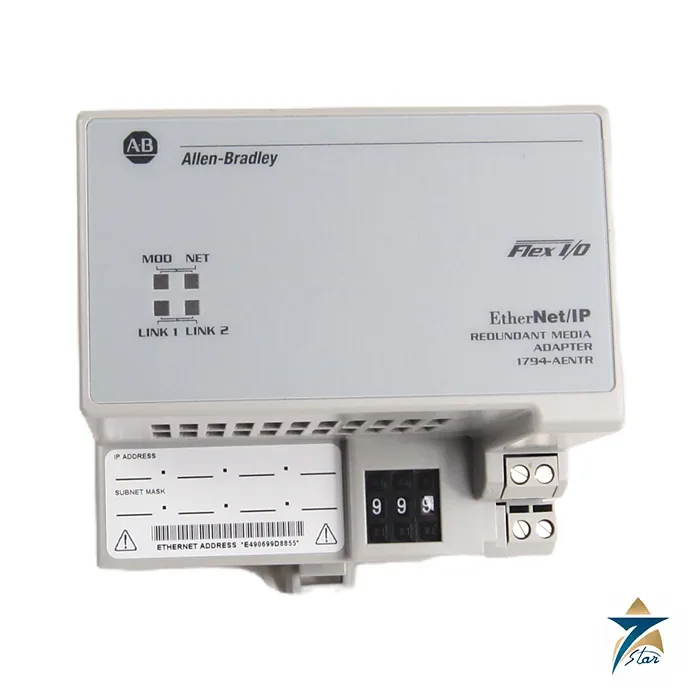
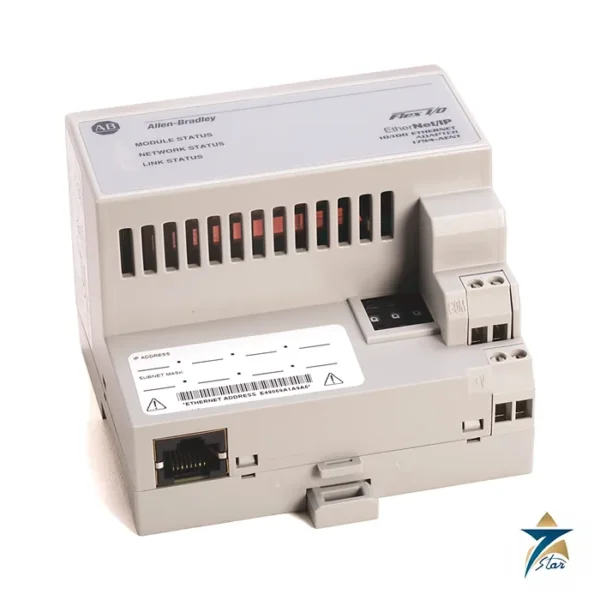
The Allen-Bradley 1794-AENTR connects a rack of up to eight FLEX I/O modules to an EtherNet/IP network through two RJ45 ports. The second port gives the adapter a built-in switch connection, and Rockwell lists the dual-port adapter as the choice for built-in switch or high-availability requirements. The controller scans the adapter and sees each module in the rack as a remote I/O point.
The adapter runs from 24 V DC, drawing 500 mA at 19.2 to 31.2 V DC, and supplies up to 640 mA of 5 V DC for the Flexbus. It is 92 mm deep because of the second Ethernet port, and weighs 227 g.
Technical specifications
| Parameter |
Specification |
| Catalog number |
1794-AENTR (1794-AENTRXT is the extreme-temperature, conformal-coated version) |
| Function |
FLEX I/O dual-port EtherNet/IP adapter module |
| I/O module capacity |
8 FLEX I/O modules |
| Ethernet |
2 RJ45 Category 5 connectors, 10/100 Mbps |
| Input voltage |
24V DC nominal, 19.2…31.2V DC (includes 5% AC ripple); SELV or PELV source for CE LVD |
| Inrush current |
18 A for 2 ms |
| Power consumption |
500 mA maximum; 400 mA at 24V DC |
| Flexbus output current |
640 mA at 5V DC maximum |
| Power dissipation |
7.1 W at 19.2V DC maximum; 24.2 BTU/hr at 24V DC |
| Isolation voltage |
50V continuous, basic insulation; type tested at 1000V AC for 60 s, power to Flexbus to EtherNet/IP |
| Wire size, power |
0.33…3.31 mm² (22…12 AWG) stranded copper rated at 75 °C or greater; terminal screw torque 0.8 N•m |
| Power wiring length |
Less than 10 m (32.8 ft) |
| Dimensions / weight |
87 x 94 x 92 mm (3.4 x 3.7 x 3.6 in.); 227 g (8.01 oz) |
| Operating temperature |
0…55 °C (32…131 °F); XT version -25…70 °C; non-operating -40…85 °C |
| Indicators |
Module status, network status, Link 1 and Link 2 (yellow/green) |
| Default network address |
Thumbwheel switches 999 with DHCP enabled; 001…254 sets 192.168.1.xxx |
| Temperature codes (as printed) |
North American T5; UKEX/ATEX T5; IECEx T5 |
| Certifications (when marked) |
c-UL-us (Class I Division 2), CE, RCM, ODVA EtherNet/IP conformance tested |
Addressing and commissioning
The adapter ships with the thumbwheel switches set to 999 and DHCP enabled. Set a valid node number from 001 to 254 to give it an address of 192.168.1.xxx with a 255.255.255.0 mask, or use a DHCP server. The gateway setting depends on firmware: for revision 1.013 and earlier the gateway is 0.0.0.0, and for revision 1.014 it is 192.168.1.1 when the switches are set from 002 to 254.
Wire the power to terminals C (+24 V DC) and F (common) and use terminals D and E to pass power to the next module. Keep the power wiring under 10 m, do not place more than two conductors on a terminal, and tighten the screws to 0.8 N•m. The link indicators show a 100 Mbps link in green and a 10 Mbps link in yellow.
AENT, AENTR and XT versions
The 1794-AENT is the single-port version, the 1794-AENTR has two ports, and the 1794-AENTRXT is the conformal-coated version for extreme temperatures from -25 to 70 °C. Choose the adapter with the number of ports and temperature range needed, and check that the controller and the 1794 modules you plan to use are supported by the adapter firmware.
Key features of the 1794-AENTR
- Two RJ45 Ethernet ports at 10/100 Mbps, so adapters can be daisy-chained without an external switch at every rack.
- Support for ring topologies in high-availability designs, where one cable break does not stop communication.
- Connects up to eight FLEX I/O modules mounted on terminal bases on a DIN rail.
- Thumbwheel switches for quick address setting, with DHCP as an alternative.
- Status LEDs for module, network and each Ethernet link, giving fast fault diagnosis at the cabinet.
- Extreme-temperature XT version available where the standard 0 to 55 °C range is not enough.
Network topology options
With a single-port adapter, every FLEX I/O rack needs its own connection to a managed switch, which adds switch ports and cable runs. The dual-port design of the AENTR allows a linear topology, where racks are chained one after another, or a device-level ring, where the last adapter connects back to the controller or a ring-capable switch. A ring configured with a supervisor gives an alternate path if a cable or a node fails.
When planning a linear chain, remember that powering down one adapter can interrupt communication to the racks behind it, so ring topology or careful maintenance planning is recommended for critical processes.
Installation and power planning
- Mount the adapter at the left end of the DIN rail, followed by the terminal bases and I/O modules.
- Add up the 5 V Flexbus current of every module in the rack and make sure the total stays within the 640 mA supplied by the adapter.
- Use a 24 V DC SELV/PELV supply sized for the 18 A inrush and the continuous load; keep power wiring under 10 m.
- Use industrial shielded Category 5 or better Ethernet cable and keep it separate from power and drive cables.
- Record IP addresses and firmware revisions in the project documentation so replacement modules can be configured quickly.
Use in Oman and GCC plants
FLEX I/O is widely installed in existing Rockwell Automation control systems in oil and gas, water treatment, power, and manufacturing facilities across the region. The 1794-AENTR is frequently used both on new remote I/O panels and when migrating older FLEX I/O racks from legacy networks to EtherNet/IP, since the I/O modules and terminal bases can often remain in place while the adapter changes.
Remote I/O cabinets in field locations can experience high internal temperatures; if the cabinet cannot be kept within 55 °C, the 1794-AENTRXT version with its wider operating range and conformal coating should be considered.
What to include in an RFQ
- Catalog number 1794-AENTR or 1794-AENTRXT and quantity.
- Required series or firmware revision if the unit replaces an existing adapter in a validated system.
- Any terminal bases, I/O modules or power supplies needed for the same rack.
- Delivery location and documentation requirements, such as certificates of origin.
Documents and quotation
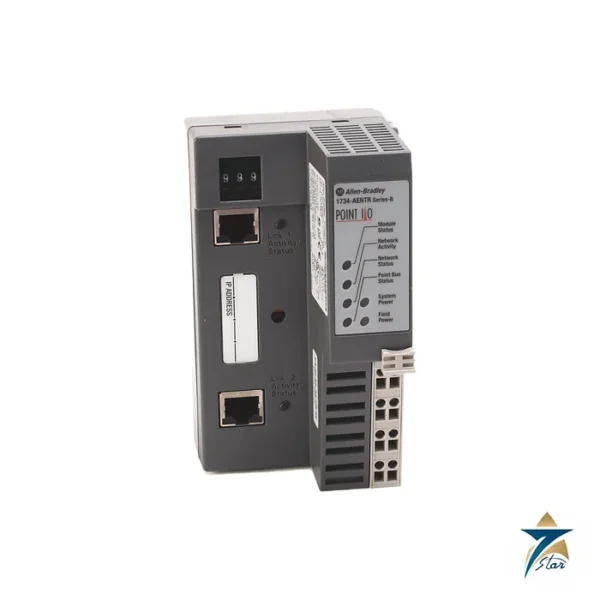
The Rockwell Automation installation instructions for the 1794-AENTR and the 1794 FLEX I/O communication adapters specification are available from the manufacturer; the installation instructions are attached. See our industrial communications category and the 1734-AENTR POINT I/O adapter. Confirm the exact catalog number, series letter and firmware or hardware revision on the product label, and the compatibility with your existing system, before ordering. Stock and lead time are confirmed at quotation.











Reviews
There are no reviews yet.