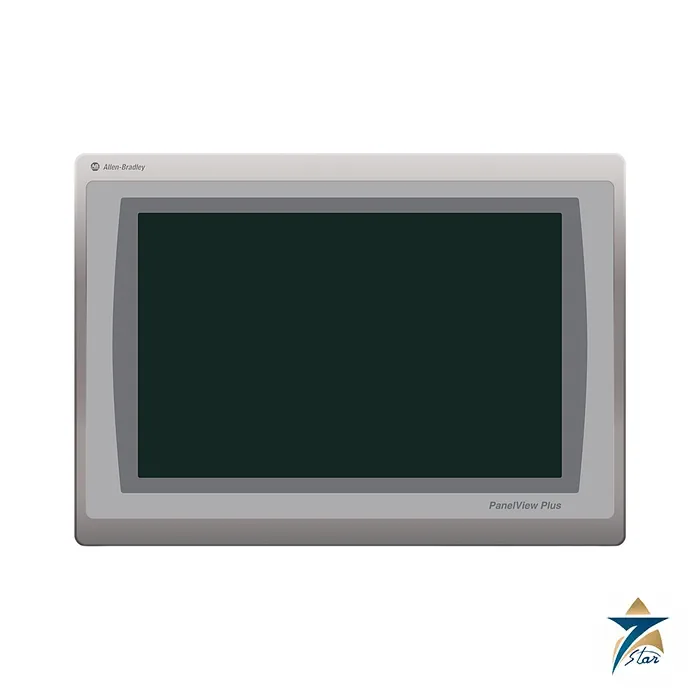
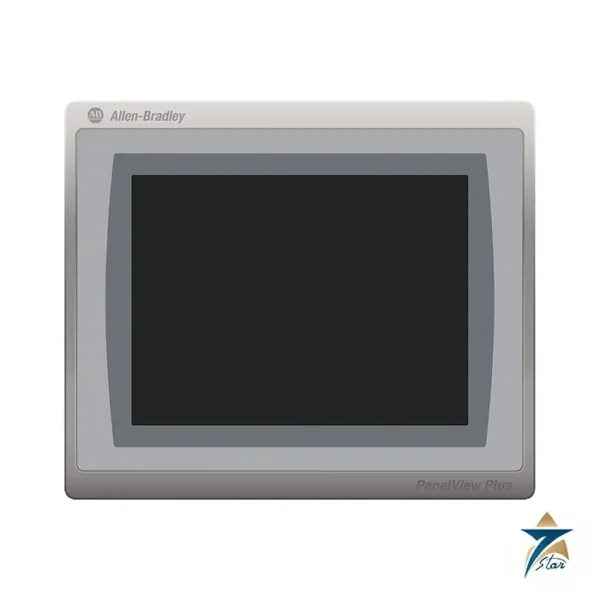
A 12.1 inch widescreen Performance terminal
The Allen-Bradley 2711P-T12W22D9P is a PanelView Plus 7 Performance operator terminal with a 12.1 inch widescreen color touch display. The 1280 x 800 WXGA screen has a viewing area of 261 x 163 mm, which is large enough for detailed machine overview screens, trend charts and alarm lists in one view. It has two 10/100 Ethernet ports for star, linear or Device Level Ring networks and is powered from 24V DC.
Like the other Performance terminals, the data sheet lists a series A version with Windows CE 6.0 and a series B version with Windows 10 IoT Core, 4 GB of RAM and 24-bit color.
Technical specifications
| Parameter |
Specification |
| Catalog number |
2711P-T12W22D9P (-B brandless and K conformal-coated versions are separate catalog numbers) |
| Series |
PanelView Plus 7 Performance; series A and series B listed in the data |
| Operator input |
Touch, analog resistive (1 million presses) |
| Display |
12.1 in. widescreen color TFT, viewing area 261 x 163 mm, 1280 x 800 WXGA, 16:10; 18-bit (series A) or 24-bit (series B) color |
| Brightness / backlight |
300 cd/m² or more; white LED, 50,000 h minimum to half-brightness |
| Memory |
Series A: 512 MB RAM, 512 MB storage, 80 MB user. Series B: 4 GB RAM, 19.87 GB storage, about 2 GB user |
| USB ports |
Series A: two USB 2.0 host; series B: one USB 3.0 host and one USB 2.0 host; one device port (type B) |
| Ethernet |
Two 10/100Base-T auto MDI/MDIX ports supporting Device Level Ring, linear or star |
| Operating system |
Series A: Windows CE 6.0; series B: Windows 10 IoT Core |
| Input voltage |
24V DC nominal (18…30V DC), SELV and PELV supplies |
| Power consumption |
Series A: 50 W max (2.1 A at 24V DC); series B: 33 W max |
| Dimensions (H x W x D) |
240 x 340 x 69.6 mm (9.69 x 13.39 x 2.74 in.) |
| Panel cutout (H x W) |
218 x 312 mm (8.58 x 12.28 in.) |
| Weight, approx |
2.54 kg (5.60 lb) |
| Heat dissipation |
12.1 in. DC: 60 BTU typical on series A and 49 BTU on series B |
| Operating temperature |
0…55 °C (32…131 °F) |
| Enclosure rating |
NEMA and UL Type 12, 13, 4X; IP66 as classified by UL |
| Vibration / shock |
0.012 in. pk-pk 10…57 Hz and 2 g 57…500 Hz; 15 g operating shock |
| Hazardous locations (as printed) |
cULus Class I Division 2 Groups A-D; Class II Division 2 Groups F and G; Class III Divisions 1 and 2 |
| Other certifications (as printed) |
CE, RCM, UKCA, KCC, RoHS; ODVA EtherNet/IP conformance tested |
Dimensions, power and environment
The housing is 240 x 340 x 69.6 mm and weighs about 2.54 kg. It mounts in a panel cutout of 218 x 312 mm. Power consumption is up to 50 W (2.1 A at 24V DC) for series A and up to 33 W for series B. Typical heat dissipation is 60 BTU for series A and 49 BTU for series B. The terminal operates from 0 to 55 °C, and the front is rated NEMA and UL Type 12, 13 and 4X, with IP66 as classified by UL.
Vibration is rated at 0.012 inch peak-to-peak from 10 to 57 Hz and 2 g from 57 to 500 Hz, and operating shock is 15 g for 11 ms.
Catalog number, size options and variants
The 12W in the catalog number is the 12.1 inch widescreen display, 22 is two Ethernet ports, D is 24V DC and 9P is the Performance series. Related catalog numbers in the same publication include the 2711P-T12W22D9PK with conformal coating, the 2711P-T12W22D9P-B without the Allen-Bradley mark and the stainless-steel -BSHK version. Smaller and larger screens are covered by the 6.5, 9, 10.4, 15 and 19 inch models.
Panel mounting the 12.1 inch terminal
Cut the panel opening to the cutout size given in the specification table and deburr the edges, because a rough or oversized cutout prevents a proper seal against the panel and the enclosure rating then no longer applies. Check that the panel material is flat and rigid around the opening. Fit the terminal following the mounting procedure in the Rockwell Automation installation instructions, tightening evenly so the front of the terminal is not distorted.
Leave space behind and around the housing for ventilation and for the Ethernet, USB and power cables, with enough bend radius that connectors are not strained. Connect a 24V DC SELV or PELV supply within the stated input range and keep the power wiring separate from motor and drive cables.
Commissioning the terminal
At first power-up, confirm which series the unit is, since series A and series B differ in operating system and memory. Set the IP addresses of both Ethernet ports to suit the chosen topology, whether star, linear or Device Level Ring, and confirm communication with the controller before loading the application. Load the runtime application, check every screen against the functional specification, and test touch response across the full display area. Keep a backup copy of the application and the terminal configuration with the panel documentation.
Selection checks before ordering
Confirm that the application was developed for the screen resolution and series of this terminal, and that the software version in use supports it. Check that the panel depth allows for the housing plus cable connections, and that the cabinet cooling can handle the heat dissipation listed on this page. Where the terminal will be installed in a classified hazardous area, compare the certifications printed on this page with the area classification before purchase.
Operating in Oman and GCC conditions
Operator panels in Oman and the GCC are often mounted on cabinets in hot process areas or in direct sunlight through windows. Heat from the sun on the display face can raise the terminal temperature well above the room air, so shade the panel face or choose a mounting position away from direct sun, and keep the temperature inside the operating range. The front rating protects against dust and washdown only when the unit is correctly sealed to the panel; inspect the seal around the front of the terminal during shutdowns. Clean the touch screen with a soft cloth and a mild cleaner, never with abrasive pads, since sand particles drag across the surface. In humid coastal plants, keep cabinet cooling stable to avoid condensation on the back of the display.
Documents and quotation
The Rockwell Automation PanelView Plus 7 Performance technical data, publication 2711P-TD009, is attached. See our HMI displays catalogue for other operator terminals. Confirm the exact catalog number, series letter and firmware or hardware revision on the product label, and the compatibility with your existing system, before ordering. Confirm the hardware series (A or B), because memory, operating system and power figures differ. Stock and lead time are confirmed at quotation.




Reviews
There are no reviews yet.