The standard Ethernet bridge for a ControlLogix chassis
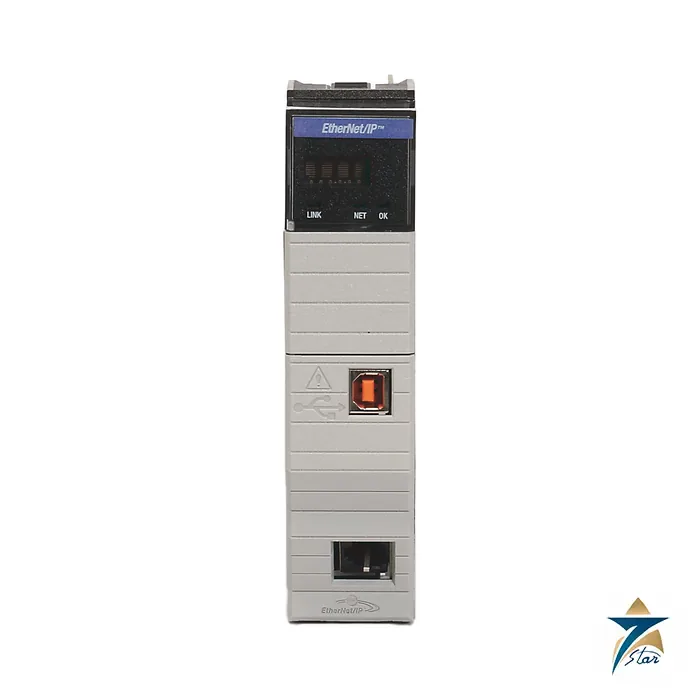
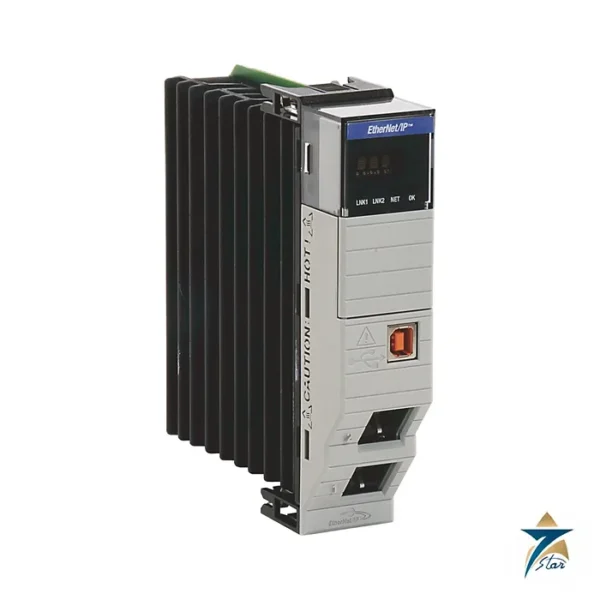
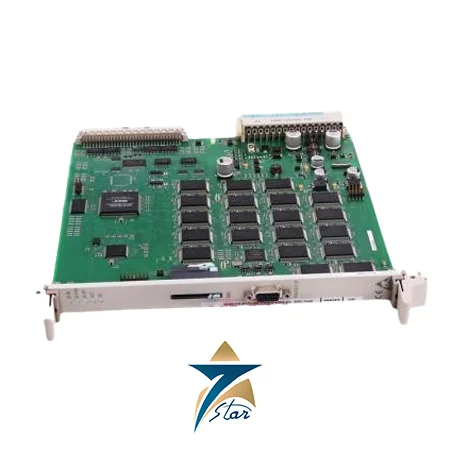
The Allen-Bradley 1756-EN2T is a ControlLogix EtherNet/IP communication module. It occupies one chassis slot and connects the controller and other backplane modules to an EtherNet/IP network, so that remote I/O, drives, HMIs and other controllers can exchange data with the chassis.
In the manufacturer selection table the EN2T is the module for controlling I/O modules and drives over Ethernet. If the network uses a Device Level Ring, the table points to the 1756-EN2TR instead; and for adapter use on a remote link it lists the 1756-EN2TP.
Technical specifications
| Parameter |
Specification |
| Manufacturer / family |
Allen-Bradley (Rockwell Automation) / ControlLogix 1756 |
| Catalog number |
1756-EN2T (1756-EN2TK coated; 1756-EN2TXT extended temperature) |
| Function |
EtherNet/IP bridge: control I/O modules and drives |
| Communication rate |
10/100 Mbps |
| TCP connections |
128 |
| CIP connections |
256 (128 plus 128 unconnected messages, backplane and Ethernet) |
| Packet rate capacity |
10,000 (firmware 2.x or earlier) or 25,000 packets/second (firmware 3.6 or later), I/O |
| Integrated motion |
Up to 8 axes (firmware 3.6 or later, RSLogix 5000 18.02.00 or later) |
| Backplane current |
1 A at 5.1V DC |
| Power dissipation / thermal |
5.1 W / 17.4 BTU/hr |
| Isolation |
30V continuous, basic insulation: Ethernet to backplane, USB to backplane, USB to Ethernet |
| Ethernet cable |
RJ45, Category 5e minimum per TIA 568-B.1 (Category 5 per ISO/IEC 11801-3) |
| USB port |
Full speed 12 Mbps, temporary local programming only |
| Operating temperature |
0 to 60 °C for standard chassis series C |
| Slot width / location |
1 / any chassis slot |
Connections and performance
The module supports 128 TCP connections and 256 CIP connections, with unconnected messages split 128 plus 128 between the backplane and Ethernet. The technical data states a packet-rate capacity of 10,000 packets per second for older firmware and up to 25,000 packets per second for firmware 3.6 or later, together with support for up to 8 integrated-motion axes when a 1756-L8x or 1756-L7x controller is used.
Features such as CIP Sync, integrated motion and exact-match keying need RSLogix 5000 version 18.02.00 or later. Check the controller revision and the software version used in the project before choosing the module.
Installation and environment
The module draws 1 A at 5.1V DC from the backplane and dissipates 5.1 W (17.4 BTU/hr). Ethernet connections use RJ45 with Category 5e or better twisted pair; the USB port is for temporary local use only and must not be used in hazardous locations. Port plugs must remain in unused ports during storage and operation.
The sheet certifies standard modules for a surrounding temperature of 0 to 60 °C in standard series C chassis, and 0 to 50 °C in series B chassis. The extended-temperature XT version covers -25 to +70 °C and is a different catalog number. The module is open-type equipment that must be installed in a suitable enclosure.
Planning the network around the module
Before the 1756-EN2T is ordered, list every device that will talk to the chassis through it: remote I/O adapters, drives, HMIs, other controllers and engineering workstations. Count the connections each device needs and compare the total with the TCP and CIP connection figures in the table above, leaving room for future additions. If the count or the I/O packet load approaches the limits, a second bridge in the same chassis can split the traffic, for example one module for I/O and drives and one for HMIs and plant-level data. Agree the IP address plan, subnet mask and gateway with the site IT or OT team early, and decide whether the plant control network will be kept separate from the office network by a firewall or a managed switch.
Installation and first power-up
The module can be inserted or removed with chassis power applied only where the hazardous-area status of the location allows it; check the installation instructions and the site rules first. Set the IP address with the rotary switches, through BOOTP/DHCP, or in the project software, and write the address on the label space so that maintenance staff can find it later. Use shielded or unshielded Category 5e cable as the network design requires, with properly crimped RJ45 connectors and enough slack and strain relief at the front of the module. Once the module is in the I/O configuration of the controller project, download the project and confirm that the status indicators show a healthy link and that each connected device reports no faults.
Firmware and software revision
Several features in the specification depend on the firmware revision, such as the higher packet rate and integrated motion. Record the firmware revision of the existing modules on site and of the controller, and check compatibility with the Studio 5000 or RSLogix 5000 version used by the plant before a spare is put into service. Keeping a written record of these revisions avoids surprises when a replacement module arrives with a different revision.
Operating in Omani control rooms and field panels
Many ControlLogix chassis in Oman sit in air-conditioned control rooms, but others are installed in remote panels at wellsites, pumping stations and utilities where cooling can fail in summer. Check the ambient temperature at the chassis, keep panel filters clean, and make sure air can flow freely around the module as described in the installation data. Where the atmosphere contains dust or corrosive gases, the coated 1756-EN2TK listed above is worth discussing at the selection stage. Keep the USB port cover closed when the port is not in use and avoid leaving laptops connected in the field.
Diagnostics and maintenance
The module has a built-in web page that shows diagnostic counters, connection status and network statistics. Reviewing these pages during routine maintenance can reveal cable faults, duplex mismatches or overloaded connections before they cause a trip. Back up the controller project after any network change, keep a labelled spare cable in the panel, and note the module catalog number, series and firmware on the maintenance record.
Documents and quotation
The installation sheet 1756-IN050 covers the family; the 1756-TD003 technical data holds the connection and packet tables. For a quotation send the 1756-EN2T reference, series, firmware requirement, quantity and the chassis. Related automation hardware is in Industrial Communications.









Reviews
There are no reviews yet.