- AC Drives
- Industrial Communications
- PLC & I/O Cards
- Vibration Monitoring
- Automation Accessories
- Controllers & Data Acquisition
- CCTV & Security
- Encoders
- Safety Switches & Guard Locking
- Industrial Computers
- HMI Displays
- Motor Soft Starters
- Isolator & Barrier
- Pneumatic Cylinders
- Servo Drives
- Automation Software
- Robotics
- Machine Vision
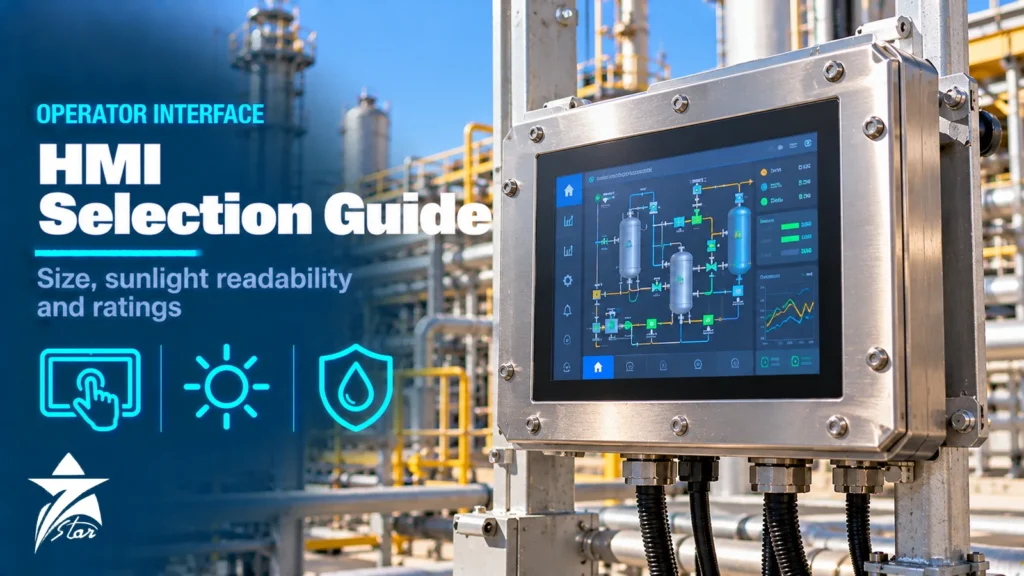
An operator panel is the part of the control system people actually touch, and a poor choice shows immediately: a screen that washes out in the afternoon sun, a touch panel that ignores gloved fingers, a display too small for the alarm list, or a unit that cannot talk to the PLC without a gateway. This HMI selection guide covers the decisions that matter on industrial projects: panel size and resolution, display brightness and sunlight readability, touch technology, communication drivers, software and licensing, environmental and hazardous-area ratings for harsh GCC sites, and how to avoid the common specification gaps.
Types of Operator Interface
Before choosing a size, decide what kind of device the application needs.
- Text and key panels: small displays with function keys for simple machines and local status. Rugged and cheap, but limited graphics.
- Graphic touch HMI panels: dedicated operator terminals with embedded runtime software, typically 4 to 22 inches. The most common choice for machines, skids and local control panels.
- Panel PCs: industrial PCs with integrated touch display running a full operating system and a PC-based SCADA/HMI package. Suitable when the panel also hosts data logging, reporting or several applications.
- Thin clients and web HMIs: display terminals that show screens served from a central server or from a web server in the controller. They simplify software management across many stations.
- Mobile and handheld interfaces: tablets or handheld panels for commissioning and maintenance, usually as a supplement rather than the main operator station.
For applications that need a full PC at the machine, see our range of industrial computers; for dedicated operator terminals, see HMI displays.
Panel Size and Resolution
Size should follow the amount of information the operator needs at once and the viewing distance, not the panel cut-out that happens to be free. A local machine panel showing a few values and buttons works at 4 to 7 inches. A skid or unit panel that shows a process overview, trends and alarms needs 10 to 15 inches. Overview displays for a small control room move to 19 inches and above, or to PC-based workstations.
| Typical size | Common resolution range | Suitable for |
|---|---|---|
| 4–7 in | 480×272 to 800×480 | Single machine, local start/stop, a handful of values |
| 9–12 in | 800×480 to 1280×800 | Skid packages, pump stations, small process units |
| 15 in | 1024×768 to 1366×768 | Unit overview with trends and alarm banner |
| 19–22 in and larger | 1280×1024 to full HD | Control-room style overview, multiple windows |
Check the exact resolution and aspect ratio on the datasheet, because they affect screen design. Moving an existing application from a 4:3 to a 16:9 or 16:10 panel usually requires screens to be reworked, not just scaled. Higher resolution is only useful if text remains large enough to read at the working distance.
Brightness and Sunlight Readability
Brightness is specified in cd/m² (nits). Standard indoor HMI panels are commonly in the range of about 300 to 500 nits, which is fine inside a building or a shaded enclosure. In direct sunlight, displays need around 1,000 nits or more to remain readable, and panels sold as sunlight-readable are typically specified from about 1,000 to 1,500 nits.
- Brightness is not the only factor: anti-glare or anti-reflective front glass and optical bonding (which removes the air gap behind the cover glass) reduce reflections and improve contrast.
- High-brightness backlights produce more heat. In GCC outdoor panels this adds to the solar load, so check the maximum operating temperature at full brightness and whether automatic dimming is available.
- A sun hood or canopy over the panel reduces both glare and heat and is often more effective than buying a brighter display.
- Check viewing angles if operators read the screen from below or from the side.
Touch Technology and Operator Input
| Technology | Strengths | Limitations |
|---|---|---|
| Analog resistive | Works with gloves and stylus, tolerant of water drops, widely used | Single touch; surface film can wear or be damaged by sharp objects |
| Projected capacitive (PCAP) | Glass front, multi-touch gestures, durable surface, good optical clarity | Glove and water performance depends on controller tuning; check the datasheet |
| Membrane or mechanical keys | Positive feedback, works with heavy gloves, no accidental touch | Fixed functions, less flexible screens |
Plants where operators wear thick work gloves, or where panels are washed down, need a technology tested under those conditions. Critical actions such as start, stop and emergency functions should not rely on the touchscreen alone: hard-wired emergency stop buttons are required by machinery safety practice, and many sites also keep physical start/stop pushbuttons next to the panel.
Also confirm the supply voltage and inrush current of the panel. Most graphic HMIs run on 24 V DC, so they can share the control panel’s DC supply and UPS-backed distribution. Panel PCs draw considerably more power and may need their own protected circuit. A panel that reboots during a brief supply dip leaves operators blind at exactly the moment they need information.
Communication Drivers and Connectivity
The HMI must talk natively to the controllers it supervises. Check the driver list in the HMI software for the exact PLC family and protocol, and the number of controllers one panel can connect to.
- Native drivers for the PLC family, for example S7, EtherNet/IP, Modbus TCP/RTU, PROFINET or vendor-specific protocols.
- OPC UA client or server for integration with SCADA and higher-level systems.
- Number and type of ports: Ethernet (one or two, ideally with separate networks for control and plant), RS-232/485 for legacy devices, USB for recipes and backups.
- Remote access functions such as VNC or web server, which must be covered by the site’s cybersecurity policy and IEC 62443 requirements.
- Tag import from the PLC project to avoid entering addresses twice.
Our article on industrial communication protocols explains the main fieldbus and Ethernet options, and the switches and gateways that connect panels to controllers are available in our industrial communications range.
Software, Licensing and Screen Design
Hardware is only half the decision. The engineering software decides how quickly screens can be built and changed, and the licence model affects long-term cost.
- Is the engineering software licensed per seat, per version, or by subscription? Does the runtime licence depend on tag count?
- Does the software support templates, faceplates and object libraries so that one pump symbol can be reused across all pumps?
- Are alarm management, trending, recipe handling, user management with audit trail and multilingual text (for example English and Arabic) included?
- Can the project be migrated to future hardware generations without rebuilding screens?
For screen design, ANSI/ISA-101.01 sets out a lifecycle approach to HMI design, covering display hierarchy, consistent use of colour and situation awareness. In practice this means grey backgrounds, colour reserved for abnormal conditions and alarms, and clear navigation from overview to detail.
Environmental Ratings for Harsh Sites
Panel HMIs are usually rated for the front face only, for example IP65 or IP66 and NEMA 4X, when correctly mounted with the supplied gasket in a flat, rigid cut-out. The rear of the unit relies on the enclosure. Key data to check:
- Operating temperature: standard panels are commonly rated to around 50 to 55 °C ambient. In the GCC, an outdoor enclosure in summer sun can exceed that, so wide-temperature models, shading and enclosure cooling are needed.
- Dust and humidity: fine desert dust and coastal humidity call for sealed enclosures, intact gaskets and, where available, conformal-coated electronics.
- Corrosive atmospheres: in plants with H2S or chlorine, stainless steel bezels and coated boards extend life.
- Vibration and shock: panels on compressors, mobile equipment or near large rotating machinery need the corresponding test ratings.
- Hazardous areas: for Zone 2 or Class I Division 2 locations, choose panels certified for that area. For Zone 1, use dedicated Ex-certified operator panels or place a standard panel in a certified purged or flameproof enclosure.
Common HMI Selection Mistakes
- Selecting by screen size and price without confirming a native driver for the PLC family.
- Using an indoor-brightness panel in a sun-exposed outdoor location.
- Ignoring the heat added by a high-brightness backlight in an already hot enclosure.
- Assuming the front IP rating covers the whole unit or remains valid with a damaged gasket.
- Choosing a touch technology that does not work with the gloves operators actually wear.
- Building screens without a style guide, so every panel on site looks and behaves differently.
- Not keeping a backup of the HMI project and runtime licence, which makes replacing a failed panel slow.
Maintenance and Replacement
Keep the latest HMI project file, the engineering software version and the runtime licence details with the panel documentation. Backlight life is finite, typically specified in tens of thousands of hours to half brightness, and outdoor high-brightness units age faster at high temperature. Replace worn front gaskets when a panel is removed. When a model is discontinued, check whether the successor fits the same cut-out and whether the project can be converted directly; manufacturers often publish cut-out adapters and migration notes.
HMI Selection Checklist
- Device type: key panel, touch HMI, panel PC or thin client
- Screen size, resolution and aspect ratio
- Brightness in nits, anti-glare treatment and need for sun hood
- Touch technology tested with operators’ gloves
- Native drivers for every connected controller, plus OPC UA if needed
- Ports: Ethernet count, serial, USB
- Software licence model, tag limits and language support
- Front IP/NEMA rating, operating temperature range and coating
- Hazardous-area certification for the installation zone
- Power supply voltage and mounting cut-out dimensions
HMI Panels and Panel PCs We Supply
Most HMI decisions come down to screen size, the PLC family and how much software the panel has to run. These examples cover the common combinations discussed above.
| Product | Type | Where it fits |
|---|---|---|
| Siemens 6AV2123-2GB03-0AX0 KTP700 Basic HMI Panel | 7-inch basic HMI | Small machines and skids with simple operating screens. |
| Siemens SIMATIC HMI TP1200 Comfort Panel (6AV2124-0MC01-0AX0) | 12-inch comfort HMI | Process screens with trends, alarms and recipes on Siemens systems. |
| Allen-Bradley 2711R-T4T PanelView 800 4.3-inch Touch HMI Terminal | 4.3-inch compact HMI | Small machines on Rockwell controllers. |
| Allen-Bradley 2711P-T15C22D9P PanelView Plus 7 Performance 15-inch Touch Terminal | 15-inch performance HMI | Larger operator stations on Rockwell systems. |
| Mitsubishi GT2510-VTBA GOT2000 10.4 Inch HMI Touch Panel | 10.4-inch HMI | Machines and panels built around Mitsubishi PLCs. |
| Schneider Electric Magelis GTU Advanced HMI Panel | Modular advanced HMI | Schneider-based systems that need more processing power at the panel. |
| Advantech TPC-1051WP-E3AE Panel PC | Panel PC | Applications that need a full PC at the machine, for SCADA clients or data logging. |
For outdoor or sun-exposed panels, tell us the required brightness, operating temperature and enclosure rating along with the PLC protocol, and send them through our quote request form.
Sourcing HMI Panels Through Seven Star LLC
Seven Star LLC supplies HMI panels, panel PCs and accessories on request from manufacturers such as Siemens, Rockwell Automation, Schneider Electric, Weintek, Pro-face and Beijer Electronics. We can help with selection and cross-checking part numbers, including matching replacement panels to existing cut-outs and PLC families. Availability and lead time are confirmed at quotation.
Replacing a failed operator panel or specifying HMIs for a new project? Send Seven Star LLC the model number from the rear label, a photo of the panel or your RFQ, and we will quote a matching unit.
Frequently asked questions
How bright does an outdoor HMI need to be?
Standard indoor panels are typically around 300 to 500 nits. For direct sunlight, around 1,000 nits or more is generally needed, and sunlight-readable models are commonly specified from about 1,000 to 1,500 nits. Anti-reflective glass, optical bonding and a sun hood improve readability as much as raw brightness.
Resistive or capacitive touch for an industrial HMI?
Resistive touch works reliably with gloves and water drops and suits harsh plant use, but it is single-touch and the surface film can be damaged. Projected capacitive touch has a durable glass front and multi-touch, but glove and water performance depends on the model, so check the datasheet and test with the gloves your operators use.
Does an IP65 front rating protect the whole HMI?
No. The rating normally applies to the front face when the panel is mounted with its gasket in a correct, flat cut-out. The rear electronics depend on the enclosure, so the cabinet must provide the required protection against dust, water and heat.
Can a standard HMI be used in a hazardous area?
Only if it carries certification for that area. Many panels are certified for Class I Division 2 or Zone 2. For Zone 1, use a dedicated Ex-certified operator panel or install a standard unit inside a certified purged or flameproof enclosure.
What is ISA-101?
ANSI/ISA-101.01 is the standard for human machine interfaces in process automation. It defines a lifecycle for HMI design and promotes consistent display hierarchy, restrained use of colour and better situation awareness for operators.
What information is needed to replace a failed HMI panel?
Send the full model number from the rear label, the panel size and cut-out dimensions, the PLC it communicates with, and the HMI project file and software version if available. With these, a direct replacement or a compatible successor can be identified.
Was this guide helpful?One click helps us write better guides for engineers.
Thank you! Glad it helped. Need this equipment for your project? Request a quotation
Thank you. We will use this to improve the guide.