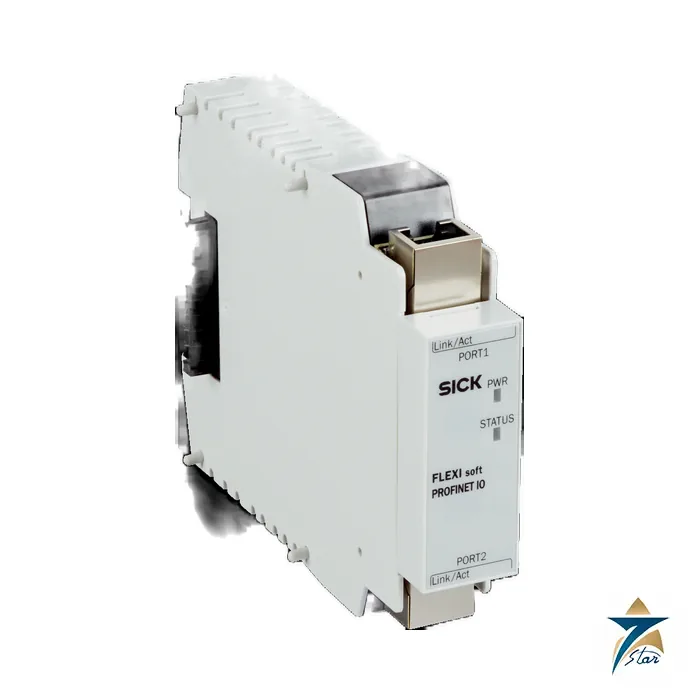
The SICK Flexi Soft FX0-GPNT00000 is a PROFINET gateway for the modular Flexi Soft safety controller. It sits on the Flexi Soft backplane and passes status, diagnostic and process data between the safety controller and a PROFINET PLC, so the control system can read safety information without extra wiring.
The module has two RJ45 ports and a three-port managed layer-2 switch, which lets it be placed in a PROFINET line. Seven Star LLC, an independent supplier in Muscat, quotes the exact SICK type code and part number from the official data sheet.
Technical specifications
| Parameter |
Specification |
| Module |
Flexi Soft gateway FX0-GPNT00000 (part no. 1044074) |
| Fieldbus |
PROFINET and TCP/IP sockets |
| Integrated switch |
3-port layer-2 managed Ethernet switch with Auto-MDI-X |
| Data rate |
10 Mbit/s (10Base-T) and 100 Mbit/s (100Base-T), autosensing |
| Connection |
2 x RJ45 sockets |
| Configuration |
Flexi Soft Designer; Safe EFI-pro System: Safety Designer |
| Supply |
Via FLEXBUS+; 3 W or less internal power consumption |
| Protection class |
III (EN 61140); enclosure rating IP20 |
| Operating temperature |
-25 to +55 C; storage -25 to +70 C; humidity up to 95 %, non-condensing |
| Dimensions and weight |
22.5 x 96.5 x 120.6 mm; 125 g (+/-10 %) |
| Certificates listed |
EU and ACMA declarations of conformity, China RoHS, CCC, cULus |
What a Flexi Soft gateway does
Typical uses are packaging lines, robot cells and conveyor systems where a PLC needs to know which guard is open, which emergency stop was pressed or whether a safety function is in a fault state. Instead of wiring each signal to a PLC input, the gateway carries the information over one Ethernet cable, which saves terminals and simplifies fault finding. A Flexi Soft system is built from a main module and expansion modules that share the FLEXBUS+ backplane, and a gateway connects that system to a fieldbus or industrial Ethernet. The FX0-GPNT draws its power from FLEXBUS+ (3 W or less) and does not need a separate supply. The data sheet lists PROFINET and TCP/IP sockets as the supported network functions.
Network features
The module has a plug-in housing of the same 22.5 mm width as the other Flexi Soft modules and mounts on a DIN rail beside the main module. The three-port layer-2 managed switch has two external RJ45 sockets and an internal connection to the gateway. Auto-MDI-X detects crossed Ethernet cables automatically, and the 10 and 100 Mbit/s rates are autosensed. The module is configured together with the safety project in the Flexi Soft Designer software; for the Safe EFI-pro system the Safety Designer software is named in the data sheet.
Selection and what to confirm
The gateway works with a Flexi Soft main module such as the SICK FX3-CPU130002 and with the other modules of the system; see also the industrial communication category for related networking products. Please confirm before ordering: the main module and system plug, the number of data bytes needed in the PLC and the DIN rail layout, because modules are 22.5 mm wide.
Key features of the FX0-GPNT gateway
- Diagnostics to the PLC: the status of inputs, outputs and logic results in the Flexi Soft project can be mapped to PROFINET data, so the HMI can show exactly which door, light curtain or emergency stop has tripped.
- Line topology support: the integrated three-port switch allows daisy-chaining to the next PROFINET device without an external switch in the cabinet.
- No separate power supply: power comes over FLEXBUS+ from the main module, which keeps cabinet wiring simple.
- Common configuration tool: gateway data mapping is done in the same Flexi Soft Designer project as the safety logic, which keeps documentation in one file.
- Slim 22.5 mm module: the gateway uses one slot width on the DIN rail, the same as other Flexi Soft modules.
Safety and non-safety data
It is important to understand the role of the gateway in the safety concept. The Flexi Soft main module and its safe I/O modules execute the safety functions; the gateway transfers data for standard control and diagnostics. Data sent from the PLC to the Flexi Soft through the gateway should therefore be used only for non-safety purposes, such as resetting a status indicator or selecting an operating mode that is then checked by the safety logic. When designing the project, follow the operating instructions for which signals may be used in the logic and verify the complete safety function according to the applicable standards such as ISO 13849-1 or IEC 62061.
Commissioning steps
- Mount the gateway on the DIN rail next to the main module and connect the FLEXBUS+ plug.
- In Flexi Soft Designer, add the FX0-GPNT to the hardware configuration and define which bytes are sent to and received from the PLC.
- Import the GSDML file of the gateway into the PLC engineering tool, assign the PROFINET device name and IP settings, and configure the same data length.
- Download the project to the Flexi Soft, verify the safety functions, and then check the data exchange with the PLC online.
Use in Oman and GCC plants
Flexi Soft systems are common on packaging and bottling lines in food and beverage plants, palletising cells, automated warehouses and conveyor systems at ports and logistics hubs in the region. The gateway is rated −25 to +55 °C and IP20, so it must be installed inside an enclosure protected from dust and water; in hot production halls without air-conditioning, cabinet cooling should keep the internal temperature below the upper limit. Since humidity must be non-condensing, sealed or air-conditioned cabinets are recommended near the coast. Use shielded industrial Ethernet cables and connectors and keep them separate from power cabling to maintain reliable PROFINET communication.
What to include in your RFQ
- Type code FX0-GPNT00000 and part number 1044074.
- Main module type and other Flexi Soft modules in the system.
- PLC type and PROFINET network details.
- Quantity and delivery location.
Documents and quotation
The attached file is the unaltered official SICK data sheet for FX0-GPNT00000. Seven Star LLC supplies the exact model code you specify and confirms availability and lead time in the quotation. Send the model code, quantity and delivery location to our team and we will respond with a price.














Reviews
There are no reviews yet.